
Subscribe to our newsletter
for the latest edTech news, free resources and competitions!
Teaching Desktop Publishing in Primary Schools with 2Publish
Nov. 30, 2026
If you’re looking for a publisher tool for your school, then try 2Publish from Purple Mash.
With thousands of ready-made templates covering a variety of cross-curricular topics, 2Publish provides primary schools with everything they need for teaching publishing in one online tool. Each template can be tailored to your specific needs, and the blank template option allows you to create something totally unique. 2Publish provides all the tools to create professional-looking publications, making it a practical alternative to traditional desktop publishing software.
What can children create with 2Publish?
Teachers and pupils can create a wide range of publications, including:
- Posters & leafelts
- Newspapers & newletters
- Greeting cards & invitations
- Book reviews
- Storyboard
- Fact files
- Certificates

Accessible publishing activities for all learners
Creating differentiated resources for publishing lessons
Teachers can make bespoke edits to ready-made templates, including adding or changing:
- ‘think about’ boxes, where you can add writing tips, prompt questions or sentence starters
- checklists to help ensure children have included everything they need
Clipart containers can also be added, making 2Publish accessible for all primary school students, whatever their needs. Switch between teacher and child views in one click, to see exactly what will be visible to students.
Children can explore all the themed projects and templates when they log in, or they can complete a 2Do that has been set by their teacher.
Accessibility features
2Publish also includes several features that support accessibility:
- Autozoom makes it easier for children to see and focus on what they're writing
- Dyslexia-friendly font Aravis is available for all to use
- Audio instructions can be recorded by the teacher
- Editable layouts mean that, teachers can alter the size and position of both text and image boxes to best suit their learners.
There are also options to lock down elements and add more elements for children who are ready for additional tools, and templates have age labels on so that teachers can easily choose the best options for their class.
Purple Mash AI in 2Publish
Purple Mash AI is a fantastic tool for quickly adapting writing templates in 2Publish, helping you to increase the level of challenge or support for SEND and EAL pupils. It’s available as an add-on to your Purple Mash subscription.
With Purple Mash AI, teachers have the option to:
- adapt the checklist, ‘think about’, or both
- select an instruction from the dropdown menu, such as adapt this for a higher ability, provide phonics-friendly vocabulary, or write their own
- select a suitable age group
- choose a language for EAL pupils
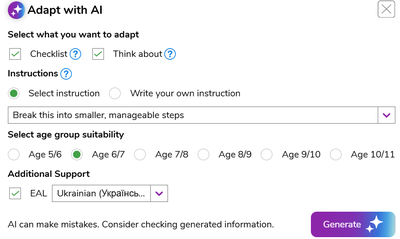
Watch this short video to see Purple Mash AI in action in 2Publish.
Easily accessing writing through Purple Mash
When setting tasks as a 2Do, teachers can select a publishing template from the drop-down menu, add a learning objective and select National Curriculum objectives. Once the work is complete, teachers can mark by adding comments and making judgements against the set National Curriculum objectives, which are fed into the Data Dashboard.